Owner-authorized audits
Internal link audits for large, complex websites
Find pages that are unreachable, buried too deeply, or receiving too little internal support. Linquisitor combines sitemap inventory with crawl and link data, then exports the URLs and links your team can act on.
- Shortest crawl depth and homepage reachability
- Incoming-link counts, referring pages, and anchor text
- HTTP and indexability checks alongside link structure
Large audits are scoped before they run. We confirm ownership or authorization, crawl access, website size, and processing capacity during onboarding.
What it answers
Turn a link graph into a fix queue
A useful internal link audit should do more than count links. It should distinguish different structural problems and show the source data behind every finding.
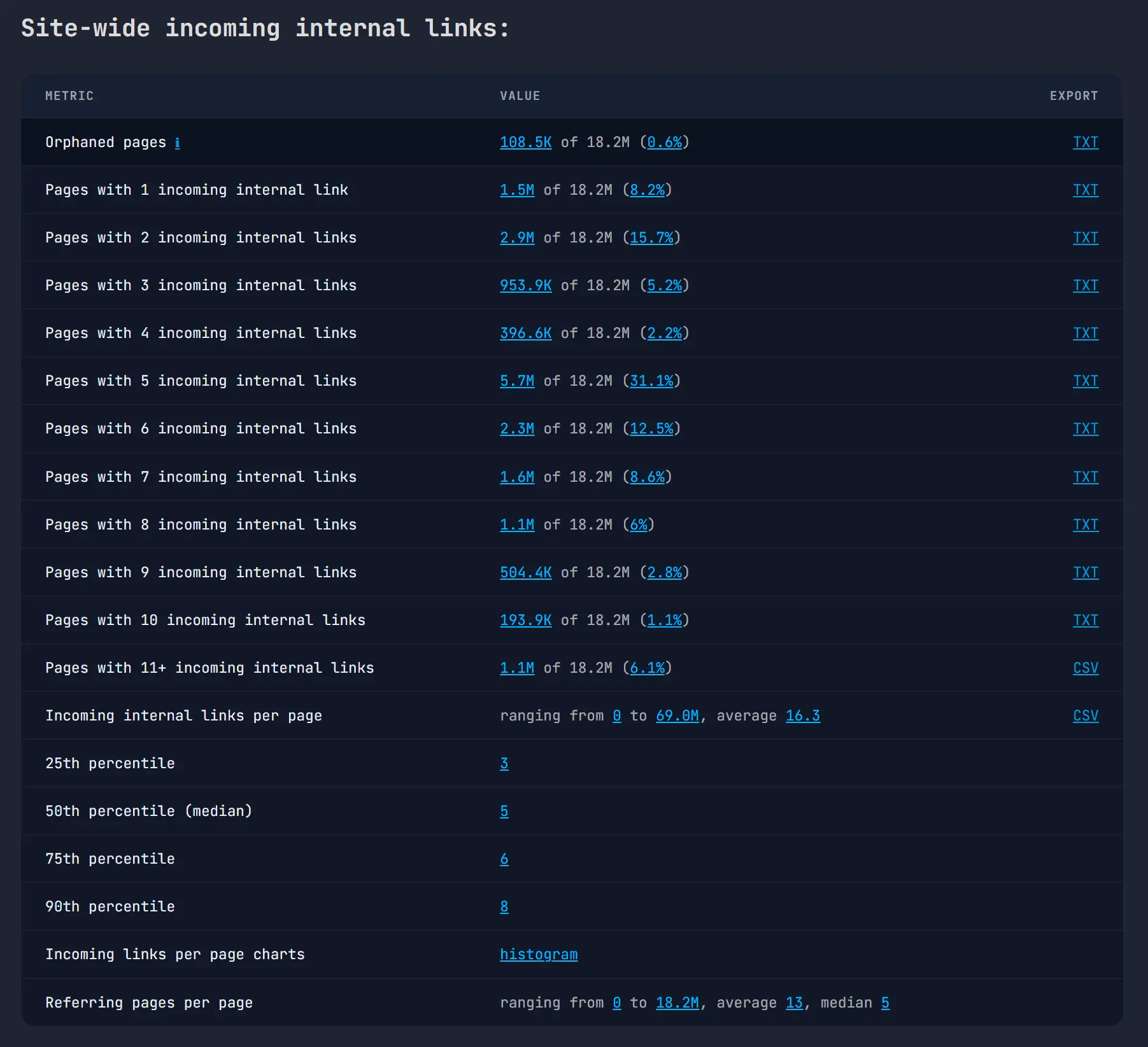
Which pages cannot be reached?
Identify pages with no incoming internal links and groups of pages with no path from the homepage.
Which pages are buried?
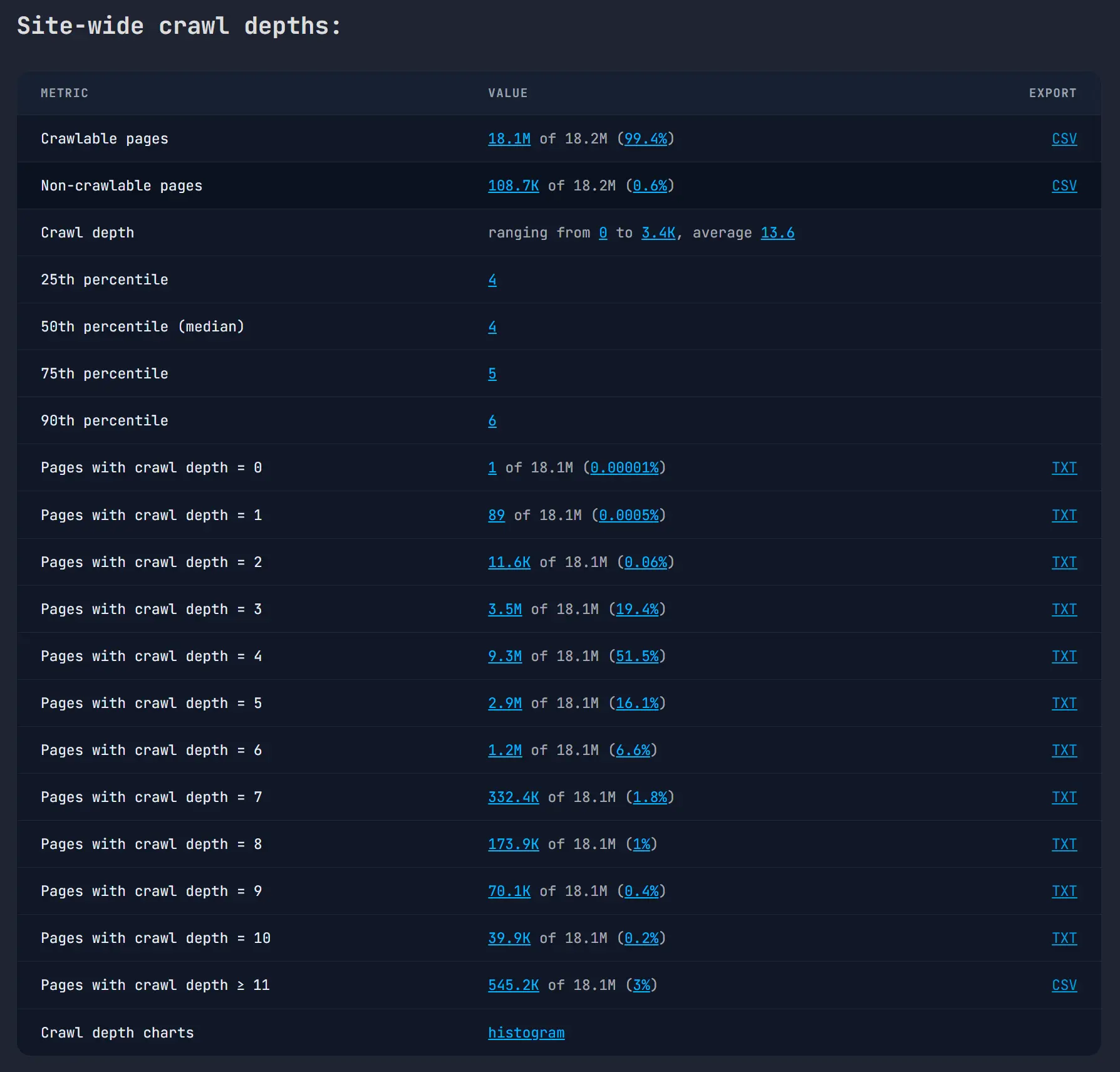
Calculate the shortest known path from the homepage and isolate important URLs at excessive crawl depth.
Where does support come from?
Inspect referring pages and incoming anchor text before deciding where a new or corrected link belongs.
Is the problem really a link?
Check status codes, robots directives, meta and X-Robots restrictions, and server response time.
How it works
Start with known URLs, then map the paths between them
- Scope an authorized website. Confirm the homepage, XML sitemaps, crawl rules, useful sections, and practical processing limits.
- Build the internal-link map. Linquisitor seeds the audit from sitemap URLs, follows discovered internal links, and maps link targets to pages in the audit database.
- Filter and export the findings. Move from site-wide distributions to the affected URLs, referring pages, anchors, and CSV or text exports.
Shortest crawl depth
See how far every reachable page sits from the homepage
A site-wide average can hide the pages that matter. Linquisitor reports the distribution, percentiles, and exportable URL groups at each depth so that teams can focus on important pages with unnecessarily long paths.
Pages with no calculated homepage path remain separate from reachable pages. This exposes disconnected clusters that a simple “zero incoming links” filter can miss.
Orphans and disconnected clusters
“Orphaned” is not always the same as “zero incoming links”
A page can receive links from other disconnected pages and still have no route from the homepage. Linquisitor keeps incoming-link counts and crawl reachability separate, allowing an audit to surface both classic orphan pages and linked clusters outside the main site structure.
The result is evidence for review, not an instruction to link every URL. Some pages should be restored to navigation, while others should be redirected, removed, canonicalized, or intentionally excluded.
Repeat audits
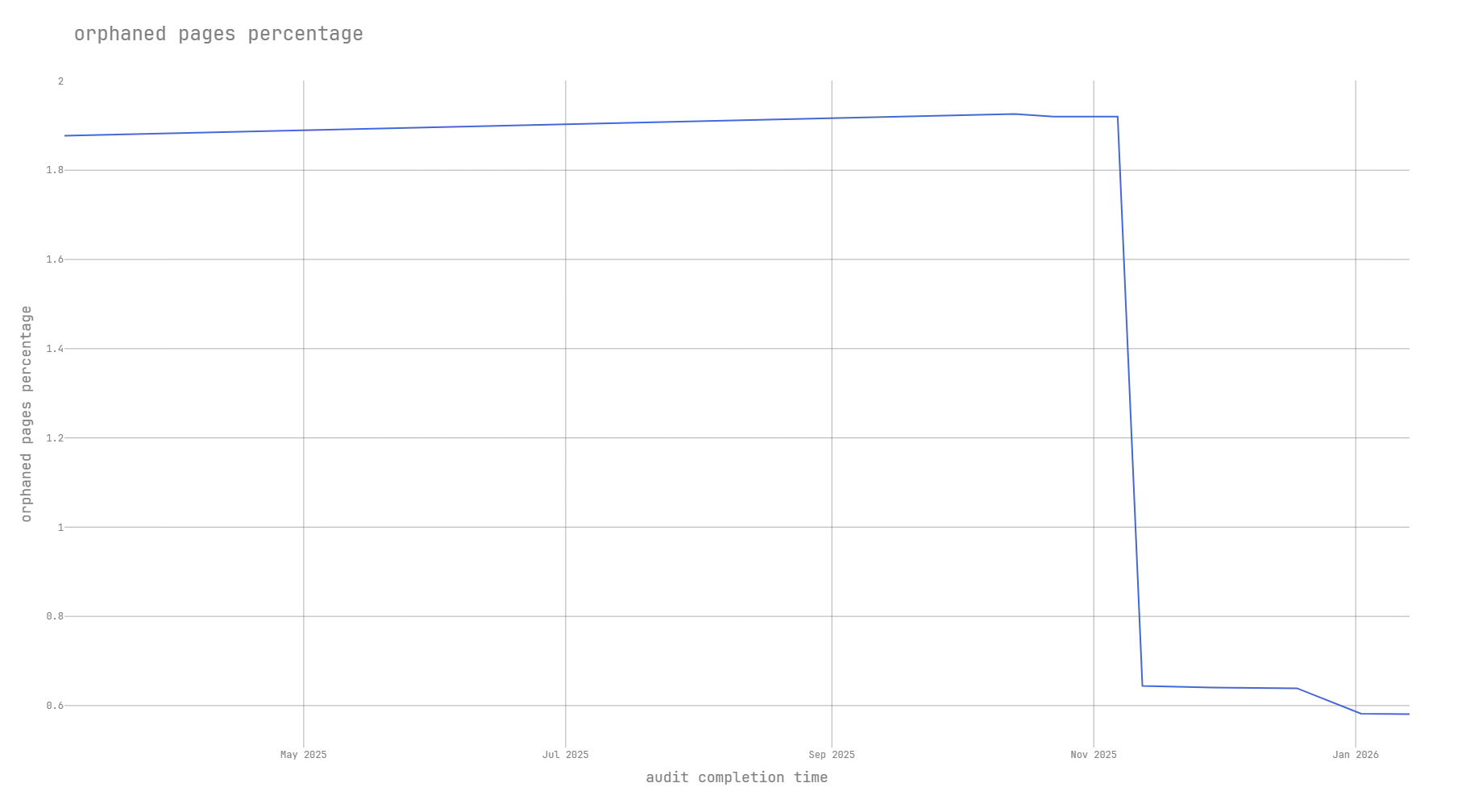
Track whether structural fixes persist
Re-run an audit after navigation changes, migrations, catalogue updates, or large publishing batches. Historical charts make regressions visible without turning a single result into an unsupported traffic claim.
Choose the right workflow
When to use Linquisitor and when a desktop crawler may be enough
Linquisitor is worth evaluating when
- Internal-link architecture is the audit’s central problem.
- The site is large or structurally complicated enough to make local analysis awkward.
- You need repeated distributions and exportable page groups.
- An agency or in-house team needs shareable evidence behind recommendations.
A desktop crawler may be enough when
- The website is small and a one-off crawl is straightforward.
- You mainly need a broad checklist of technical SEO issues.
- You do not need hosted processing or recurring structural comparisons.
- The website owner cannot authorize and support the crawl.
Audit outputs
From summary metrics to the exact URLs
- Orphaned and non-reachable page lists
- URLs grouped by shortest crawl depth
- Pages grouped by incoming-link count
- Referring pages for a selected target URL
- Incoming anchor-text distributions
- Broken and unmapped internal-link targets
- Robots, meta robots, X-Robots, and status-code reports
- CSV and text exports for prioritization
Before an audit
Questions about access, scale, and scope
Can Linquisitor audit any website?
No. Large crawls must be authorized by the website owner and may require crawl-rule, access, or infrastructure coordination.
Can I start a multi-million-page audit instantly?
No. We scope large audits first and confirm that appropriate processing capacity is available before the audit begins.
Does Linquisitor replace a general SEO crawler?
No. It is focused on internal-link structure, crawl reachability, indexability signals, and exportable structural reports.
How does Linquisitor define an orphan page?
It reports pages with no mapped incoming internal links and separately identifies pages for which no path from the configured homepage can be calculated.