Linquisitor
Pricing Log in Sign up

Home → Use cases → Orphan page checker tool


Orphan Page Checker Tool

Last updated: 23 March 2026


1. Orphan pages definition

We define "orphan pages" as pages with no incoming internal links. There are different definitions of orphan pages used by other technical SEO companies, but this one is clear and operational.

There are also orphan clusters: groups of pages that link to each other, but still have no crawl path from the homepage. These pages may have incoming internal links, and yet remain unreachable for search engine bots crawling the site structure from the homepage.


2. Incoming internal links: classic orphan pages

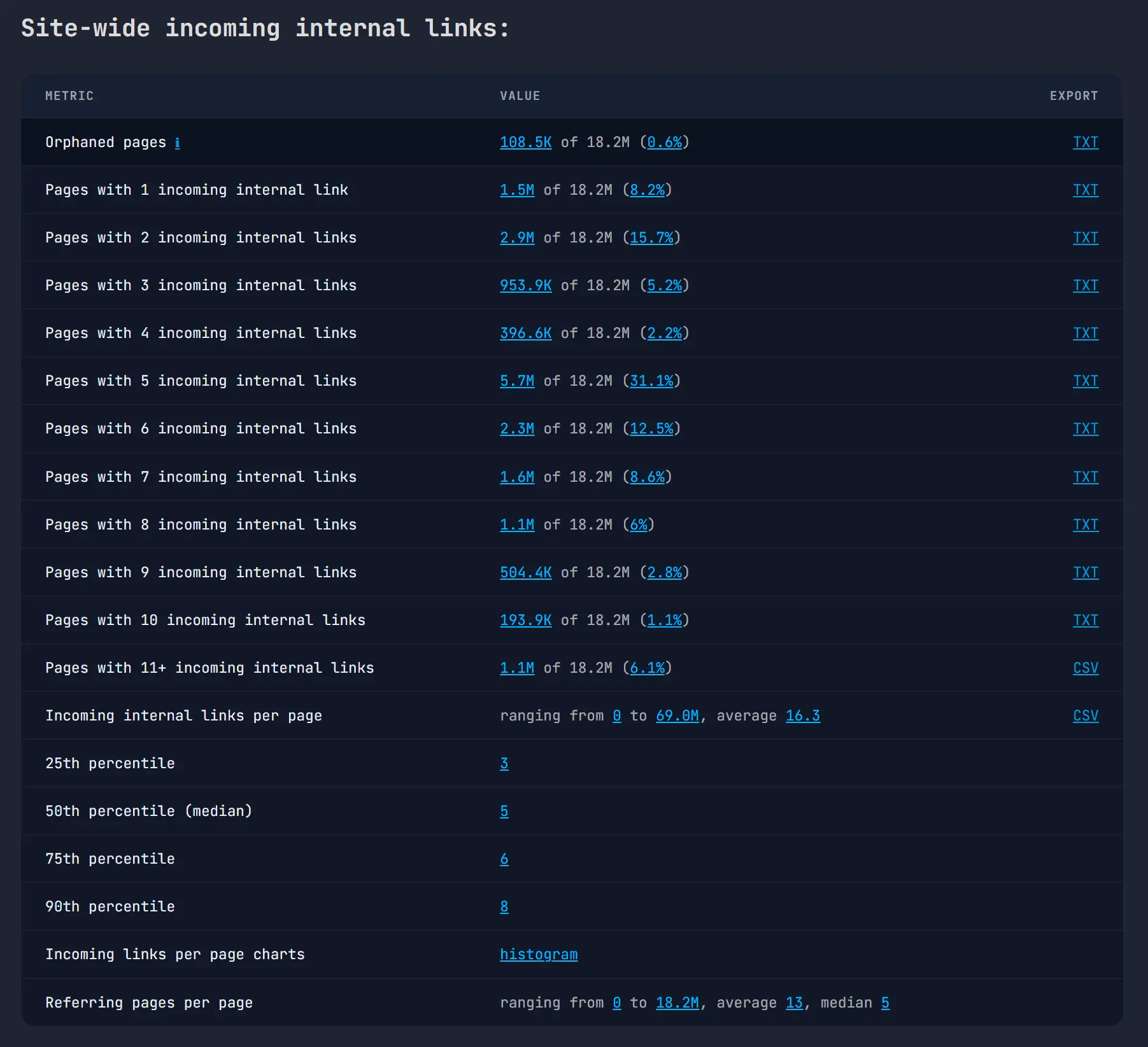
In Linquisitor, the Site-wide incoming internal links section is the fastest way to find classic orphan pages. The Orphaned pages row shows the URLs with 0 incoming internal links and gives you a TXT export of the exact list.

The neighboring rows help with prioritization too. Pages with only 1 incoming internal link are not orphaned in the strict sense, but they are often one removed link away from becoming orphaned and usually deserve review alongside the true 0-link pages.

On a large site, tiny percentages still translate into a lot of URLs. In one 13.3M-page audit, Linquisitor surfaced about 2.8K orphaned pages and another 73.5K pages with just 1 incoming internal link. The histogram is useful here because it shows whether those low-link buckets are rare outliers or a structural pattern across the site. In that same example, 97.9% of pages were in the 11+ incoming internal links bucket, which made the weakly linked pages easy to spot as exceptions.

Linquisitor incoming internal links report with orphaned pages highlighted
The incoming internal links section surfaces classic orphan pages first, then the weakly linked URLs right above them.

3. Crawl depth: orphan clusters and pages with no homepage path

Incoming internal links alone are not enough. A page can have incoming links and still be unreachable from the homepage if all of those links come from other disconnected pages. That is what an orphan cluster looks like.

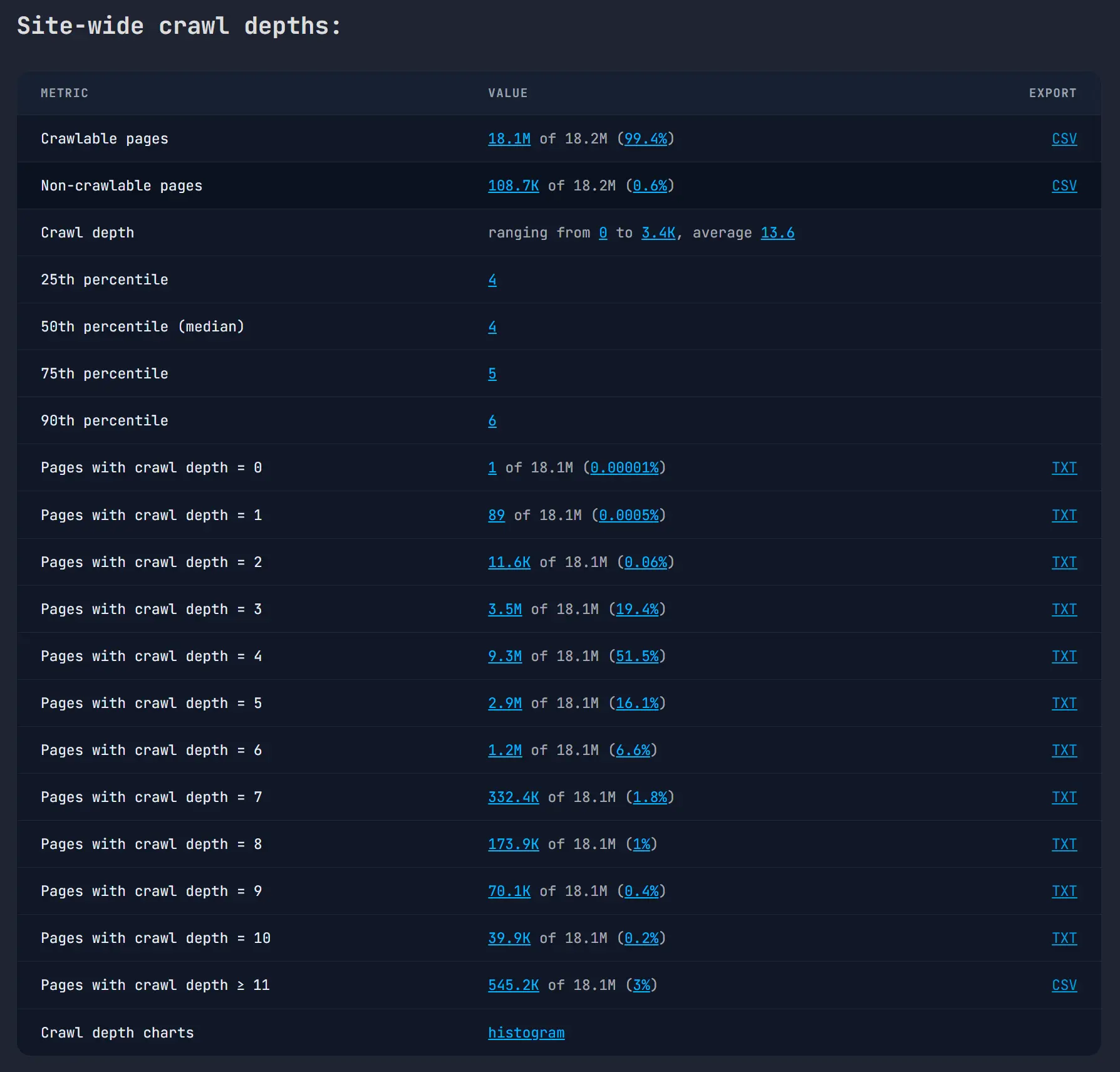
This is why the Site-wide crawl depths section is needed in an orphan-page audit. Crawl depth is calculated from the homepage: depth 0 is the homepage itself, depth 1 is one click away, and so on. If Linquisitor cannot calculate any crawl path from the homepage, the page lands in the Non-crawlable pages row.

That row is how you find all pages without a crawl path from the homepage, including orphan clusters. The non-crawlable CSV export includes the incoming internal link count for each URL, which makes the distinction straightforward:

  • Classic orphan page: no incoming internal links.
  • Orphan cluster page: one or more incoming internal links, but still non-crawlable from the homepage.

This matters even when the overall site architecture looks healthy. In one example audit, the median crawl depth was 4 and the 90th percentile was 5, yet Linquisitor still found about 3.6K non-crawlable pages. Without the crawl-depth section, those disconnected URLs would be easy to miss.

Linquisitor crawl depths report showing non-crawlable pages
The crawl depths section exposes URLs with no homepage crawl path, which is how orphan clusters show up.

4. How to use Linquisitor as an orphan page checker

Because orphan pages and orphan clusters have no crawl path from the homepage, they need to enter the audit from somewhere else. In practice, that usually means your XML sitemap(s). If a URL is missing from both the homepage crawl and the sitemap inputs, no crawler can discover it reliably.

  1. Feed Linquisitor the XML sitemap(s) for the pages you want audited, then run the crawl.
  2. Open Site-wide incoming internal links and export the Orphaned pages list.
  3. Review the Pages with 1 incoming internal link row and the histogram to spot URLs with dangerously weak internal support.
  4. Open Site-wide crawl depths and export the Non-crawlable pages CSV. These are the pages with no crawl path from the homepage.
  5. Split those non-crawlable pages by incoming internal links: 0 links means classic orphan pages, while 1+ links usually means orphan clusters or other disconnected pockets of the site.
  6. Add links from crawlable parts of the site such as category hubs, navigation, breadcrumbs, HTML sitemap pages, and relevant contextual content links. Then rerun the audit.

In short, Linquisitor does not reduce orphan-page auditing to a single metric. The incoming-links section finds the classic orphans, and the crawl-depth section finds the disconnected clusters. Used together, they give you the full set of pages that cannot be properly reached from the homepage through the site's internal link structure.


© 2023-2026 Linquisitor
Articles Use cases Bot Privacy policy Terms of service Refund policy